 Cowork
Throttle control in an FPV sim: how to hover, hold height and stop drifting
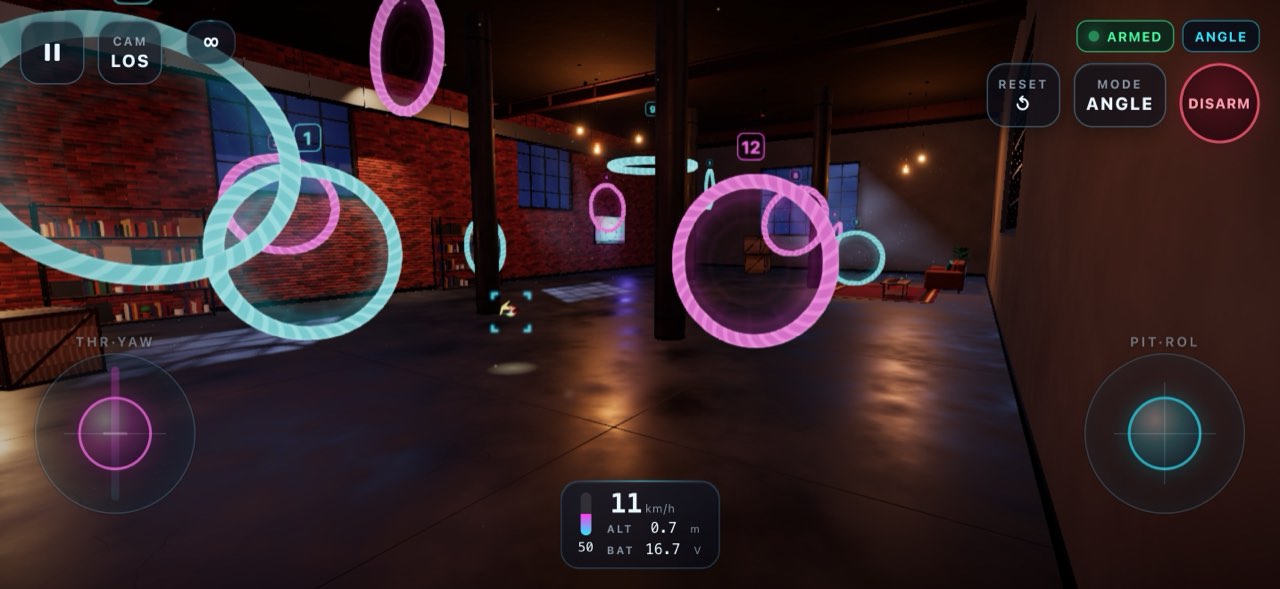
Pitch, roll and yaw are about direction. The throttle is about staying in the air at all, and it never stops needing attention. This guide is a practice plan for that one stick, using Drone Sim as the practice tool. It assumes you have done the tutorial; if not, start with Getting started with FPV in Drone Sim.
Why the throttle is the hardest stick
First, on the other sticks centre means "do nothing". On a raw throttle, the position that holds the quad still is somewhere in the middle of the travel, and you have to find it and keep your thumb there. On most real transmitters the throttle stick does not spring back to centre either, so it stays wherever your thumb leaves it.
Second, the quad answers late. Drone Sim models each motor with a short spin-up lag, a few hundredths of a second, longer for big props than for tiny ones. The quad also has real momentum. So you add power, nothing seems to happen, you add more, and then all of it arrives at once. That is the root of most beginner over-correction: reacting to where the quad is instead of where it is going.
Third, the right amount of throttle keeps changing. Tilt the quad and part of the motors' push goes into moving sideways instead of holding it up, so it sinks. Fly close to the ground and ground effect gives a little extra lift, which Drone Sim calculates for each rotor. Fly for a while and the battery sags; the game simulates a lithium pack whose voltage falls as it empties, and while the flight controller compensates for most of the flight, the last minute of a long flight is noticeably weaker. The hover point is a moving target.
What the three modes do with the throttle
The flight modes guide covers the modes in full. For throttle practice, this is the part that matters:
- GPS turns the throttle into a climb rate. Centre holds the current height, up climbs, down descends. This works on controls that spring back to centre, including touch with throttle auto-centre on. Climbs are capped at 3 m/s and descents at 2.5 m/s, and a small dead band around centre stops a loose thumb from causing drift.
- Angle levels the quad when you let go of the right stick, but the throttle is raw. It stays where you leave it, and the quad climbs or sinks depending on how much power you give it. Every time you tilt, you need a bit more.
- Acro gives you raw throttle and no levelling at all. The quad holds whatever attitude you leave it in, so the throttle pushes along whatever direction the quad happens to be pointing, not always up.
Set up before you practise
These throttle settings sit on the same screen as the rates:
- Throttle mid is the output at the centre of the stick. Leave it on Auto, which sets it to the hover point.
- Throttle expo flattens the curve around mid, so small movements near hover make smaller changes.
- Throttle limit caps the output at full stick while centre still hovers. Useful if a full punch sends you into the ceiling.
On a gamepad you can put throttle on a stick or on the right trigger, and set the stick deadzone in the controller setup. On a keyboard, where a key is either on or off, X snaps the throttle to the estimated hover point in Angle and Acro. Use it as a reset, not a crutch.
For the drone, fly Strider, the quad the default settings are tuned around. Dome is the gentler choice for the indoor stages because its prop guards let it bump off walls. Leave Pip for later: it is light and floaty and drifts with every input, which is a good lesson but a confusing first one. For the camera, chase is the easiest view for judging height.
The practice plan
Do one or two stages per session, and repeat any that still feel like a fight. Free Fly has no clock and no course, so use it for every drill that does not need rings.
Stage 1: GPS, Training Field, height steps
Open Free Fly on the Training Field in GPS mode. Climb to about head height and let go of the throttle. The quad stays there. Now fly height steps: push up a little, stop at roughly twice the height, let go. Pull down a little, stop, let go. Notice how the climb rate follows how far you move the stick.
The goal is to learn what your thumb is doing. Most beginners are surprised how small a movement is enough.
Stage 2: Angle, Training Field, the ten-second hover
Switch to Angle. Unlike GPS, Angle needs the throttle low and the quad level before it arms, just like a real quad. Arm, then raise the throttle slowly until the quad lifts off, and try to hold it at head height for ten seconds. The course guide calls this the single most useful FPV skill, and it is right.
- Hover at head height, then come down to just above the grass and hold there. Close to the ground the quad gets extra lift from its own downwash, so the same stick position hovers higher.
- Once the hover is steady, fly slowly to each of the three rings and stop next to it. Every time you tilt forward, add a touch of throttle. Every time you level out to stop, take that touch away again.
- Land by lowering the throttle a little at a time.
Stage 3: Angle, Night Loft, holding height in a box
The Night Loft is a tight indoor course with ceiling beams and a ceiling fan whose blades really are solid. The course guide calls it the best place to learn precise throttle control: floor and ceiling are close together and you feel both. Fly Dome here; it survives the walls far better than open-prop quads.
Start in Free Fly and hover at mid height between floor and beams. Then race the Sprint route, which keeps six of the twelve rings, alone. Keep your speed down through the first rings and watch the fan before you pass it.
Stage 4: Angle, Toy Town, climbing on time
Toy Town has wide streets and an open sky, and its route runs over the towers. The tip from the course guide: those rings reward a smooth climb started early, not a hard pull-up at the last moment. That is a pure throttle lesson. Fly it alone, then race the Novice and Rookie bots, who also fly in Angle.
Stage 5: Acro, back in the open
In Acro, go back to the Training Field and climb high first so you have time to recover. Roll to a gentle bank, hold it, and notice that the quad starts to sink: the throttle is now pushing partly sideways. Add a little throttle to keep height through the bank, then take it out as you roll back to level. If the quad gets away from you, switch to GPS with one press, let it level, and switch back. Later, in the Alpine Valley, tilt forward before you add throttle so you carry speed into the climbs.
Common mistakes and how to read them
- The quad bounces up and down and the bounces get bigger. You are over-correcting. Each correction arrives late and you correct the correction. Make smaller movements and wait to see the result before you move again. Throttle expo helps.
- The quad slowly sinks during forward flight. You tilted without adding throttle. In Angle and Acro, tilt and throttle go together.
- The quad shoots up when you stop. The extra throttle you added for forward flight is still there when you level out, and now it all pushes straight up. Ease it off as you level.
- The quad drifts sideways in an Angle hover. That is not the throttle. Angle levels the quad but does not hold its position, so any speed you had keeps carrying you. Correct with small right-stick inputs.
- The hover worked at the start but now the quad sinks. Late in a long flight the simulated battery is weaker, so the same stick gives less push.
- Hard landings. The throttle came down too fast, and the motors cannot spin back up in time to catch the drop.
On Hoi An by Night and Ha Long Bay, touching the water ends your run, so a small sink costs you the race. On Ha Long Bay, fly a metre or two higher until you know the line.
When to move up a mode
Move from GPS to Angle once you can make the quad stop at a chosen height without thinking, and you have finished a race in Toy Town in GPS. Move from Angle to Acro when you can hold the ten-second hover without looking at your thumbs, fly the Night Loft without bouncing off the floor or beams, and beat the Rookie opponent. Finishing the Night Loft without a crash is also one of the goals for earning Needle, so it makes a good test.
Moving up does not mean never going back. A few minutes of Angle hovering is a good warm-up at any level.
Keep it short and often
Throttle control comes from many short sessions more than a few long ones. You can practise right now in your browser at dronesim.coworkgamestudio.com/play/, or get the game for iPhone, iPad, Mac, Android or Meta Quest from the Drone Sim page.
Have a question about this article or found something that does not match the game? Write to us at support@coworkgamestudio.com.