 Cowork
A 1 kHz flight model in a browser tab
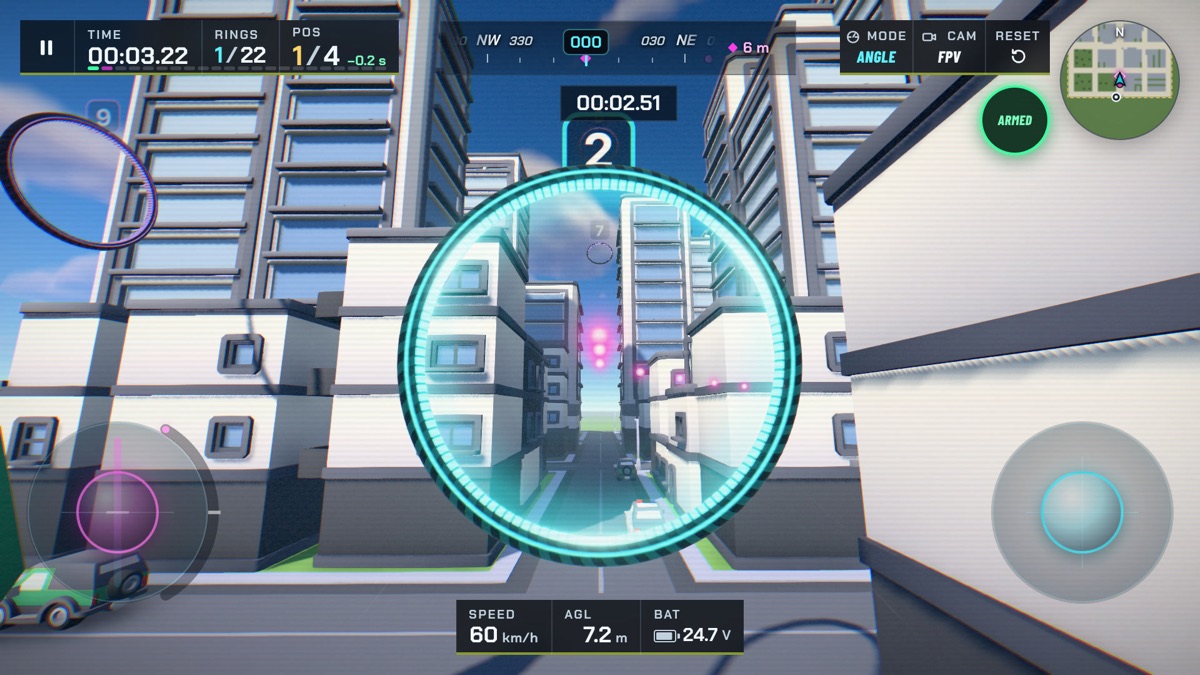
An FPV racing quad is one of the most demanding things you can try to simulate in a game. It has no wings to keep it steady and no autopilot holding it level unless you ask for one. Four motors, a battery and a small flight controller are all that stand between a pilot's thumbs and the ground. If the simulation gets the small things wrong, experienced pilots feel it within seconds: the quad floats, stops too quickly or turns like a toy.
This article explains how Drone Sim models a quad, and why we run that model a thousand times a second inside an ordinary browser tab.
Why a thousand steps a second
A real flight controller runs its control loop several thousand times a second. The motors respond in a few hundredths of a second, and a quad can rotate faster than two full turns per second. A game that updates physics once per rendered frame, at 60 times a second, simply cannot follow those changes. The control loop overshoots, the quad wobbles, and the only cure is to make everything softer and slower than it should be.
Drone Sim instead advances its physics in fixed steps of one millisecond. Each rendered frame runs as many of those steps as the elapsed time needs: about sixteen at 60 frames per second, about eight at 120. The renderer then blends between the last two physics states, so the quad moves smoothly on screen even though the screen and the physics run at different rates. This approach is often called a fixed-timestep loop, and it has a second advantage: the same inputs always produce the same flight, whether the game runs on a fast desktop or an older phone.
There is a safety valve too. If a device stalls for a moment, the loop runs at most a quarter of a second of catch-up steps and then lets the game slow down briefly, instead of freezing while it tries to simulate everything it missed.
The body: six degrees of freedom
The quad itself is a rigid body that can move along three axes and rotate around three. Each step adds up the forces and turning moments acting on it and updates its speed, position and orientation. The rotation includes the gyroscopic effect of a spinning body, which is what makes a heavy long-range quad feel slow to change direction and a tiny whoop feel instant.
Every airframe in the game has its own mass, arm length, motor strength and drag. Its inertia comes from its mass and size, with a little extra for ducted frames, whose guards carry weight far from the centre.
Motors that take time to spin up
A real motor cannot change speed instantly. When you punch the throttle there is a short delay before the props reach full speed, and a slightly longer one when they slow down. Drone Sim models each motor with that lag, a few hundredths of a second, shorter for tiny motors and longer for big seven-inch props. The difference is something pilots notice: a big quad feels "lazy" on the throttle, a racer feels like it snaps forward.
Thrust grows with the square of the motor's speed, and the motor's speed is not a straight line from the throttle either. Loaded by a propeller, a motor reaches a large part of its speed early in the throttle range. Modelling that curve is why a freestyle quad in the game hovers at around a quarter throttle, as it does in real life, instead of the third or more a simpler model would need.
When the motors change speed they also twist the frame the other way, and the spinning props push back on the air. Both effects show up as yaw: a hard throttle punch makes the quad try to rotate slightly, and the flight controller has to correct for it.
A battery that sags
Fly a real quad hard and you feel it lose punch as the battery drains. Drone Sim simulates a lithium battery pack whose resting voltage falls as it empties, and which also drops for a moment under heavy load. Less voltage means less thrust. The flight controller compensates the way Betaflight's sag compensation does, so the stick feel stays consistent for most of the flight, but the last minute of a long flight is noticeably weaker. Flight times in the game, from under four minutes for a racer to nearly ten for the long-range quad, come out of this model rather than a timer.
Drag and ground effect
Air resistance in the game is quadratic: double the speed and the drag force quadruples. It is also different along each axis of the quad, since a quad pushing through the air flat-on meets far more resistance than one diving nose-first. On top of that, the spinning props create a drag force in the plane of the rotors that grows with thrust. Together they set each quad's top speed, which we measure in tests and keep within a few percent of the published numbers.
Close to the ground, a quad gets a little extra lift from its own downwash bouncing back, an effect known as ground effect. Drone Sim calculates it for each rotor separately, against the floor and against the tops of boxes and buildings below. Hover low over a table edge with half the quad over it and you will feel it tilt.
A flight controller like a real one
The pilot never drives the motors directly. Just as on a real quad, the sticks go to a flight controller, which decides how hard each motor should spin. Ours works the same way as the open-source Betaflight firmware that most real FPV quads run:
- A simulated gyro measures the rotation, with a little noise and filtering, as a real sensor would.
- A rate controller with proportional, integral and derivative terms (a PID loop) turns the difference between the rotation you asked for and the rotation measured into motor commands.
- A mixer spreads those commands across the four motors and keeps the quad controllable when the motors are at their limits, giving up yaw before roll and pitch.
- Stick input is shaped by Betaflight's "Actual" rates, so the same numbers mean the same stick feel in the game and on a real quad.
Each airframe's controller gains are scaled to its own torque, so every quad responds crisply instead of the heavy ones feeling sluggish and the light ones oscillating.
Three flight modes on one controller
On top of that loop sit the three flight modes. Acro is pure rate control: the stick sets how fast the quad rotates, and nothing levels it for you. Angle adds a self-levelling outer loop, so the stick sets a tilt angle up to 55 degrees, the same limit as Betaflight's default. GPS mode adds altitude hold and position hold: the throttle stick sets a climb rate, the right stick sets a speed, and letting go brakes the quad to a stop. The braking is calculated so the quad never pitches harder than a real one could, and it arms itself when a race starts, which is why complete beginners can fly in their first minute.
Our flight modes guide explains how to move from one mode to the next.
Collisions and crashes
For collisions, each quad is a small cluster of spheres: one for the body and one for each prop. Contacts are resolved with impulses and friction, so a quad glancing off a wall loses speed and spins rather than stopping dead. Whether a hit counts as a crash depends on the speed of the impact and on the airframe. Ducted whoops are built to bump off walls and survive; a racer breaks at much lower speeds. Landing upside down, or touching the water on the Ha Long Bay course, also ends the run.
Running it all in a browser
All of this runs in JavaScript on the main thread of the page, written so that a physics step allocates no memory and creates no work for the garbage collector. A step for one quad takes a tiny fraction of a millisecond, which leaves room to fly several AI pilots with the very same physics. The bots in a race are not scripted paths: they fly the same simulated quads, through the same flight controller, as you do.
The result is a simulator that starts with a single link and still behaves like a real quad once the assists are off. If you have never flown FPV before, our getting started guide is the best place to begin.
Have a question about this article or found something that does not match the game? Write to us at support@coworkgamestudio.com.