 Cowork
Racing online: rooms, ghosts and leaderboards
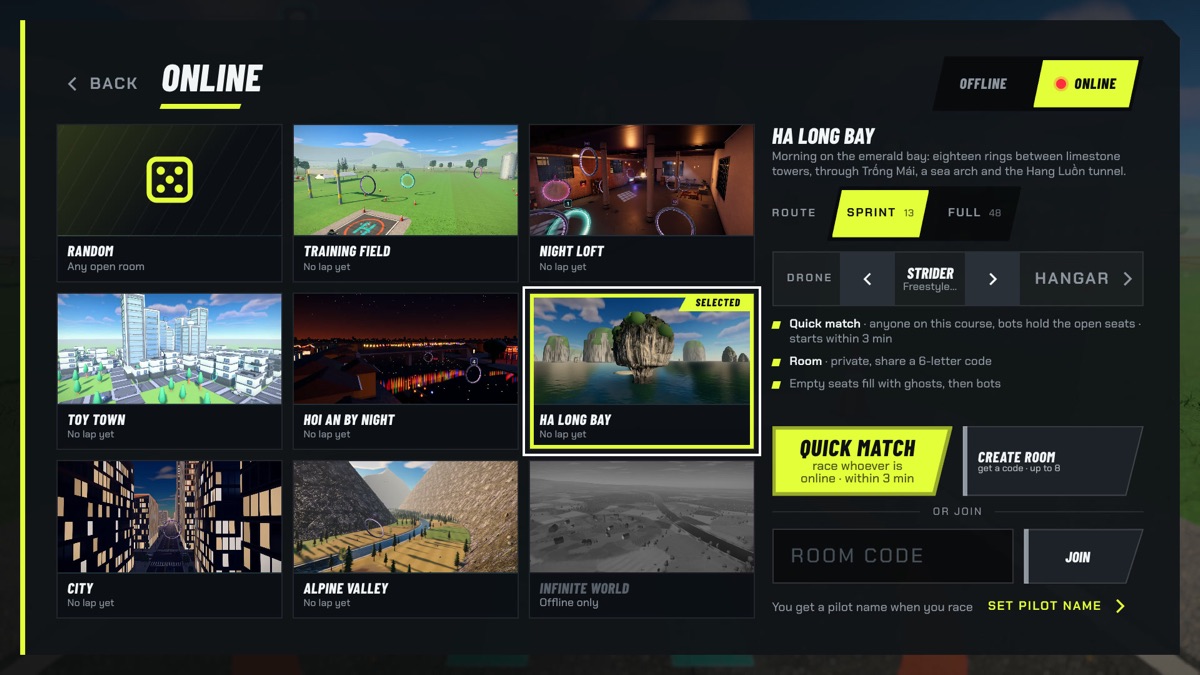
Flying a drone simulator alone is good practice. Racing other people is what keeps you coming back. When we added online racing to Drone Sim, we set ourselves three goals: a race should start in seconds, it should work on a phone connection as well as on fibre, and nobody should need an account. This article describes how we got there.
Three ways to race online
- Quick match puts you in a race on the course you chose straight away. The room already has opponents, so you never wait in an empty lobby. When other people join, they take the place of a bot.
- Private rooms are for racing friends. You get a six-character room code to share; anyone who types it joins your room. The host chooses when to start and can add or remove bots.
- Ghosts let you race the recorded best lap of any pilot on a leaderboard, at any time, with no one else needed online.
One small server per race
Every live room runs on its own small program in the cloud, on Cloudflare's network. The room's code is its name, so everyone who types the same code reaches the same room. The room keeps the list of seats, starts the countdown, and relays each pilot's position to the others. When a race ends and everyone leaves, the room goes away. There is no game server sitting idle, and a room runs close to the players instead of in one far-away data centre.
Room codes use only letters and digits that are hard to confuse when read aloud or typed on a phone. There is no 0 or O, no 1, I or L, so "it's B, not 8" is about the only argument left.
Twenty updates a second, drawn smoothly
Each pilot's game sends its quad's position, orientation and speed twenty times a second, packed into 32 bytes. That is small enough to work well on a mobile connection. On every other screen, a remote quad is drawn a tenth of a second in the past, smoothly blended between the two most recent updates. That small delay means there is almost always real data on both sides of the moment being drawn, so remote quads glide instead of jumping.
If updates stop for a moment, which happens on mobile networks, the remote quad keeps moving along its last known velocity for a quarter of a second and then holds still. After a longer gap it fades and shows "Reconnecting…". A pilot who drops out has a while to come back and take their seat again before they are counted as not finishing.
Everyone flies the bots
Rooms fill empty seats with bots so that a race always feels like a race. A common way to do that is to let one player's game simulate the bots and send their positions to everyone else. We do something different: the room hands every player the same random seed, and every player's game flies the bots itself, with the same physics and the same AI. Because our simulation is deterministic, the bots fly identically on every screen without a single extra byte of network traffic. It also means a bot does not stutter when the player who would have hosted it has a bad connection.
Empty seats are filled first with ghosts of real pilots, picked from the middle of the leaderboard rather than the record holder, and then with bots of different skill. You never meet your own ghost.
A fair start and a fair clock
The start of a race is set on the room's clock, five seconds ahead. Each player's game measures the difference between its own clock and the room's clock from regular pings, keeping the measurement from the fastest round trip, and counts down to the same moment. Players on slow connections see the same GO as everyone else.
The finishing order is also the room's decision, not the players'. When a quad passes a ring, the room records the time on its own clock. Rings only count in order, so no one can skip ahead, and no game can claim a faster lap than the room saw.
Ghosts: your best lap, replayable
Whenever you set a personal best, the game keeps a recording of that lap: where your quad was and how it was turned, twenty times a second. A typical lap is about a hundred kilobytes. Replaying it, the game blends between those samples, so the ghost flies as smoothly as you did.
Every row on a leaderboard has its ghost attached. Pick any pilot and you can race their best lap on your own, as often as you like, and see exactly where they take the faster line. "Challenge a friend" turns your own best lap into a link: whoever opens it lands on the same course with the same drone, racing your ghost. On iPhone and iPad the link opens straight in the app.
Leaderboards that compare like with like
A pilot with a gamepad and a pilot with two thumbs on glass are not playing the same game. That is why every course has its own leaderboard for each drone class, with tabs for touch, keyboard, gamepad and VR pilots, plus an All tab that shows each pilot's best on any controller. Each board shows the top 100, and if you are outside the top 100 you still see your own row and rank. Boards are also cached on your device, so you can look at them offline.
Keeping times honest
An online leaderboard is only fun if the times on it are real. Every submitted run goes through checks on the server, using the same rules the game itself uses: the course and time must be valid, there must be exactly one split time per ring, in order, and the recorded ghost has to agree with the lap time and move at speeds a quad can actually fly. Runs that fail those checks are rejected or kept hidden. Pilots can report a name, which also blocks that pilot on their own device and sends the report to the studio.
No account, still yours
You do not sign up to race online. The first time you go online, the game creates an anonymous pilot ID with a random pilot name such as "Pilot-0420", which you can change to something you like. Names are unique, so no one else can race under yours. The server stores no email address and no password, only a scrambled form of your pilot's secret key, and pilots who stop playing are removed after two years. Our privacy policy has the details.
Want to try it? Open Drone Sim, pick Online, and press Quick match. You will be on the start line in seconds.
Have a question about this article or found something that does not match the game? Write to us at support@coworkgamestudio.com.