 Cowork
Building Ha Long Bay in code
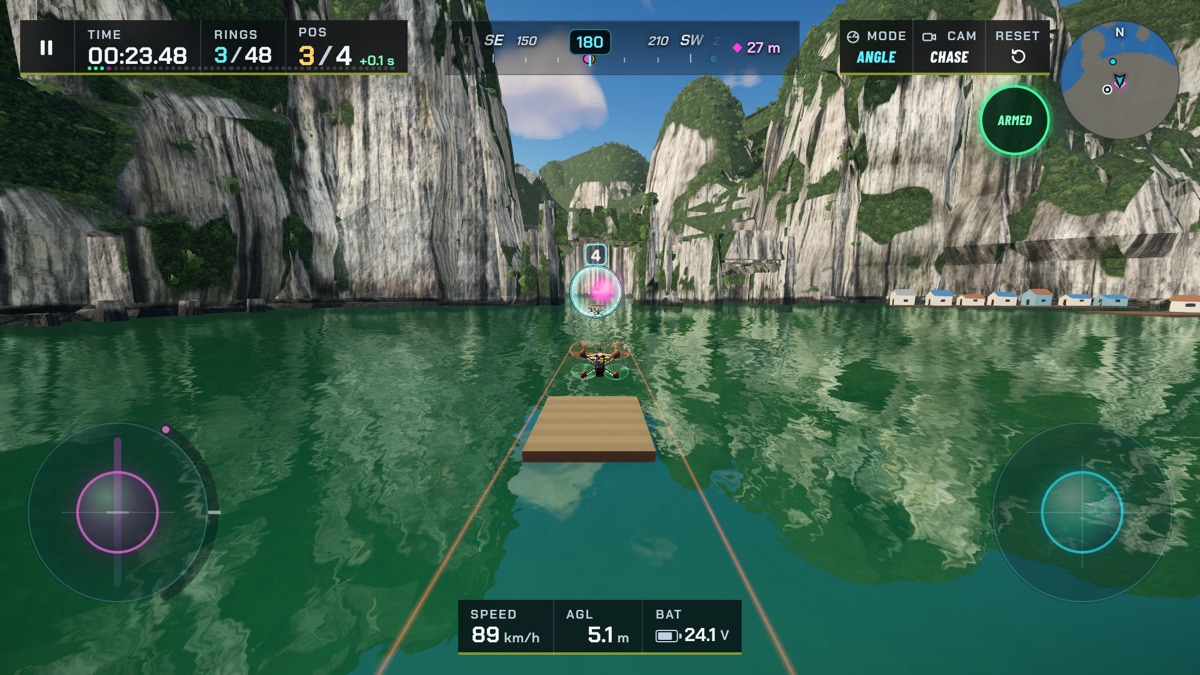
Ha Long Bay is one of the most recognisable landscapes in Viet Nam: hundreds of steep limestone islands rising straight out of calm green water. As a studio based in Ho Chi Minh City, we wanted it in Drone Sim from the start. It is also one of the hardest places to put in a game that has to run in a phone browser and in a VR headset: a huge open view, dozens of tall, rough rock towers, and water everywhere reflecting them.
The course went through three versions before it shipped. This article walks through what we tried and what we kept.
Starting from the real bay
We did not want a generic "islands in the sea" course, so the layout comes from the real bay. Using OpenStreetMap data, published under the Open Database License, we took a 3.4 km square of the bay around the islands of Bồ Hòn, Hang Luồn and Ti Tốp and traced 27 island footprints from it. To make the course work for a racing drone, the map is shrunk to 70% horizontally while the heights of the rock stay at their real scale. The islands end up a little closer together, so there is always something interesting just ahead, and the towers keep their true, dramatic height.
A few famous rocks from elsewhere in the bay were brought in as homages, such as the Đỉnh Hương rock, shaped like an incense burner. They are clearly not where they stand in real life, and we say so in our design notes.
Version one: towers turned on a lathe
The first bay built every island in code, as a stack of rings of rock, a bit like turning a vase on a lathe, with noise to break up the outline. It was very light, with a few thousand triangles for a nearby tower and a few hundred far away, and it downloaded nothing at all. But real karst towers are not round. They are fluted, overhanging and full of ledges, and the lathe shapes looked smooth and toy-like next to photos of the bay.
Version two: a library of sculpted rocks
Next we tried detailed models. For each of twelve rock types we made a concept image, turned it into a high-detail 3D model with an image-to-3D tool, and then rebuilt it ourselves in Blender: a clean low-poly shape with the detail of the original baked into colour and normal maps, at about 8,000 triangles close up and only a few hundred far away. The whole library cost a few hundred generation credits and a few cents of image generation.
The models looked good up close. The problem was repetition. Twelve shapes, rotated and scaled, were not enough for a bay of dozens of islands seen from every angle, and the eye quickly spots the same rock twice.
Version three: faceted rock built in code
The bay that ships today goes back to code, with a different idea. Each island is built from a stack of convex rock pieces, sliced and faceted like real weathered limestone, so every island is unique. Those same convex pieces are also the island's collision shapes. That matters in a drone game: the rock you see and the rock you hit are exactly the same, so you never clip an invisible corner or fly through a ledge.
Generating every island takes several seconds, too long to do on a phone while a race loads. So the bay is generated once, offline, and saved as a compact binary file of about 2 MB compressed, which the game reads in about a tenth of a second. The rock is cut into 357 tiles of 100 metres, each with several levels of detail, drawn in large batches so the whole bay needs only a few dozen draw calls. Near the drone, tiles switch to their most detailed version, and the work of building those is done on a background thread so the frame rate stays smooth.
The best of the sculpted library stayed: the Đỉnh Hương rock is still one of the baked models, because nothing generated in code could match it.
Rock that looks like rock
The rock surface blends colour detail from our generated textures with free photographic rock and moss materials from ambientCG, published under CC0. Each island gets its own colour map, so weathering, moss and stains differ from island to island. Up to 160 small leaf cards per tower add the vegetation that clings to the real cliffs.
Jade water and reflections
The water is a single surface that follows the camera, shaded jade green with small ripples. On powerful computers it shows a true mirror reflection of the towers and the sky, rendered at reduced resolution to save time. On phones and in VR, that mirror would cost several milliseconds per frame, so those devices reflect a captured image of the sky and surroundings instead. You get the same colour and mood, at a fraction of the cost.
The sky is a mid-morning scene with the sun low in the east. Fog over the bay thins out with height, so distant islands fade into haze the way they do on a humid morning, while the view from high above stays clear.
Budgets for every device
Every course in Drone Sim has to stay within a budget of draw calls and triangles per frame for each class of device. For Ha Long Bay, in our measurements:
| Device class | Budget (draws / triangles) | Ha Long Bay, measured |
|---|---|---|
| Desktop, high quality | 150 / 600,000 | 59–75 / 121,000–183,000 |
| iPhone, medium quality | 110 / 250,000 | 31–39 / 42,000–60,000 |
| Meta Quest, both eyes | 80 / 120,000 | 30–44 / 52,000–111,000 |
The Quest number is the tightest: a headset draws every frame twice, once per eye, at a high, steady frame rate. The detail ranges for each quality level are tuned so that the bay looks right from the drone's height without crossing those limits.
Water is part of the course
The last piece is gameplay. On Ha Long Bay the water is not just scenery: touch it and your run ends. That turns skimming low between the islands, the most beautiful way to fly the bay, into a real test of throttle control. The Full route is a long, 48-ring tour of the bay; the Sprint route keeps 13 rings for quick races.
You can fly it for free in the browser: open Drone Sim and choose Ha Long Bay, or read the course guide for tips.
Have a question about this article or found something that does not match the game? Write to us at support@coworkgamestudio.com.